For Rocket League on PC · Free

Every rank in the lobby, without leaving your match.

RLytics shows the tracker of every player in your match and puts their rank, division and MMR right on your scoreboard when you hold Tab.

Download for Windows

Windows 10 / 11 · automatic updates

“Windows protected your PC” message? Click More info, then Run anyway. It only shows up on the first install.

  • Compatible with Easy Anti-Cheat: nothing is injected into the game
  • Steam and Epic, keyboard and controller
  • Your MMR curve, notes on players and anti-tilt
  • Color themes and anime themes
  • Players you met before, FPS counter and music playing in game
  • In English and French
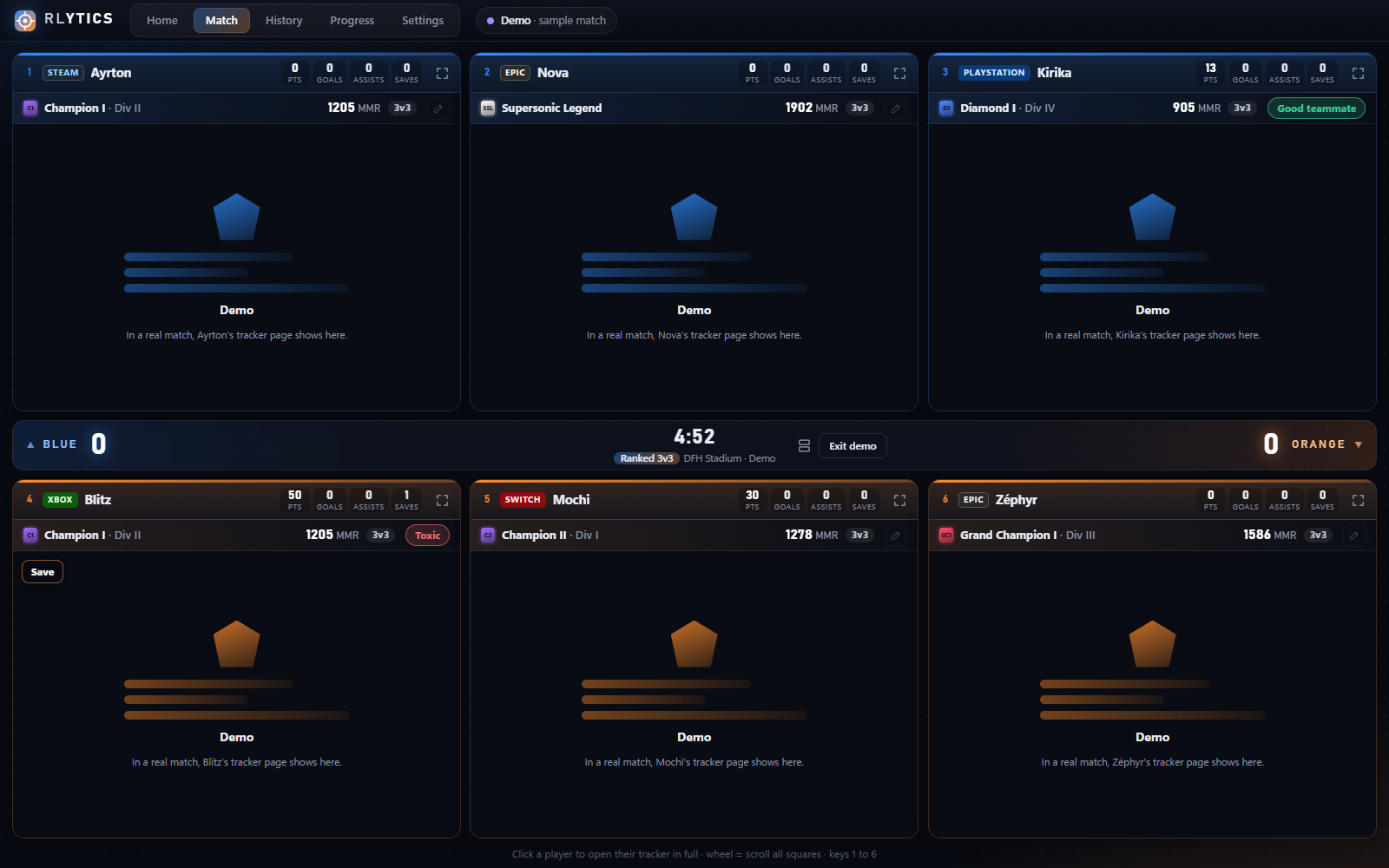
The RLytics window during a 3v3 match: one square per player with their rank, division and MMR

Everything you need to know who you’re playing against

▦

Every player’s tracker

As soon as the match starts, RLytics opens the tracker page of every player: 2, 4 or 6 squares depending on the mode. Click a player to see them in full, or open them in your browser. You can also see one team at a time in full screen (the 3 Blues, then the 3 Oranges).

◆

Ranks in the Tab overlay

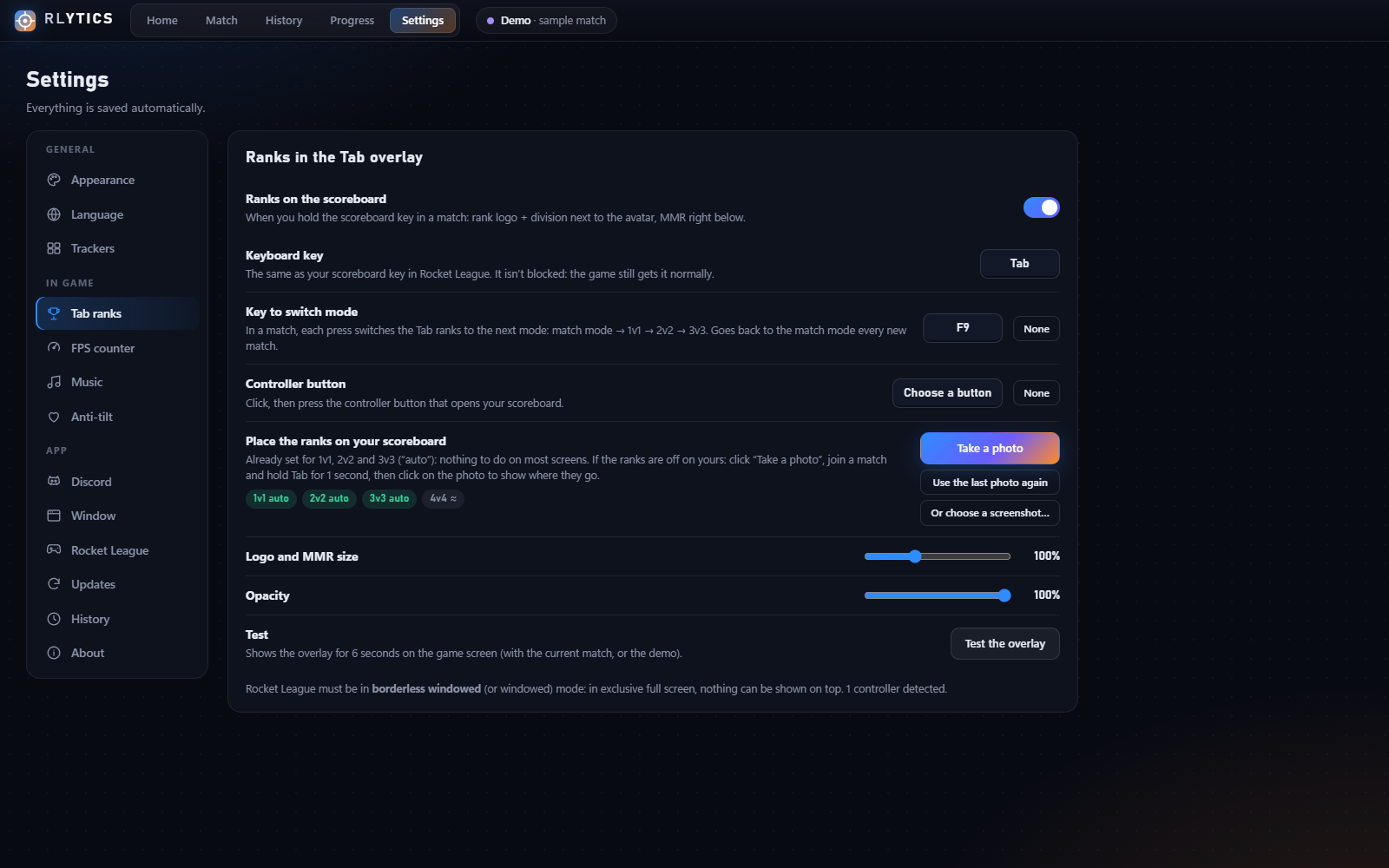
Hold Tab (or your controller button): the rank logo, division and MMR show up next to each player, for the mode you’re playing. Press F9 to see their 1v1, 2v2 or 3v3 ranks.

✓

Compatible with Easy Anti-Cheat

RLytics reads Rocket League’s official Stats API: the game itself gives the player list. Nothing is injected, the game’s memory is never read.

↻

Match history

Every match is saved: score, result and players, with a link to their tracker. Handy to find that amazing teammate again… or that smurf.

↗

Your progress

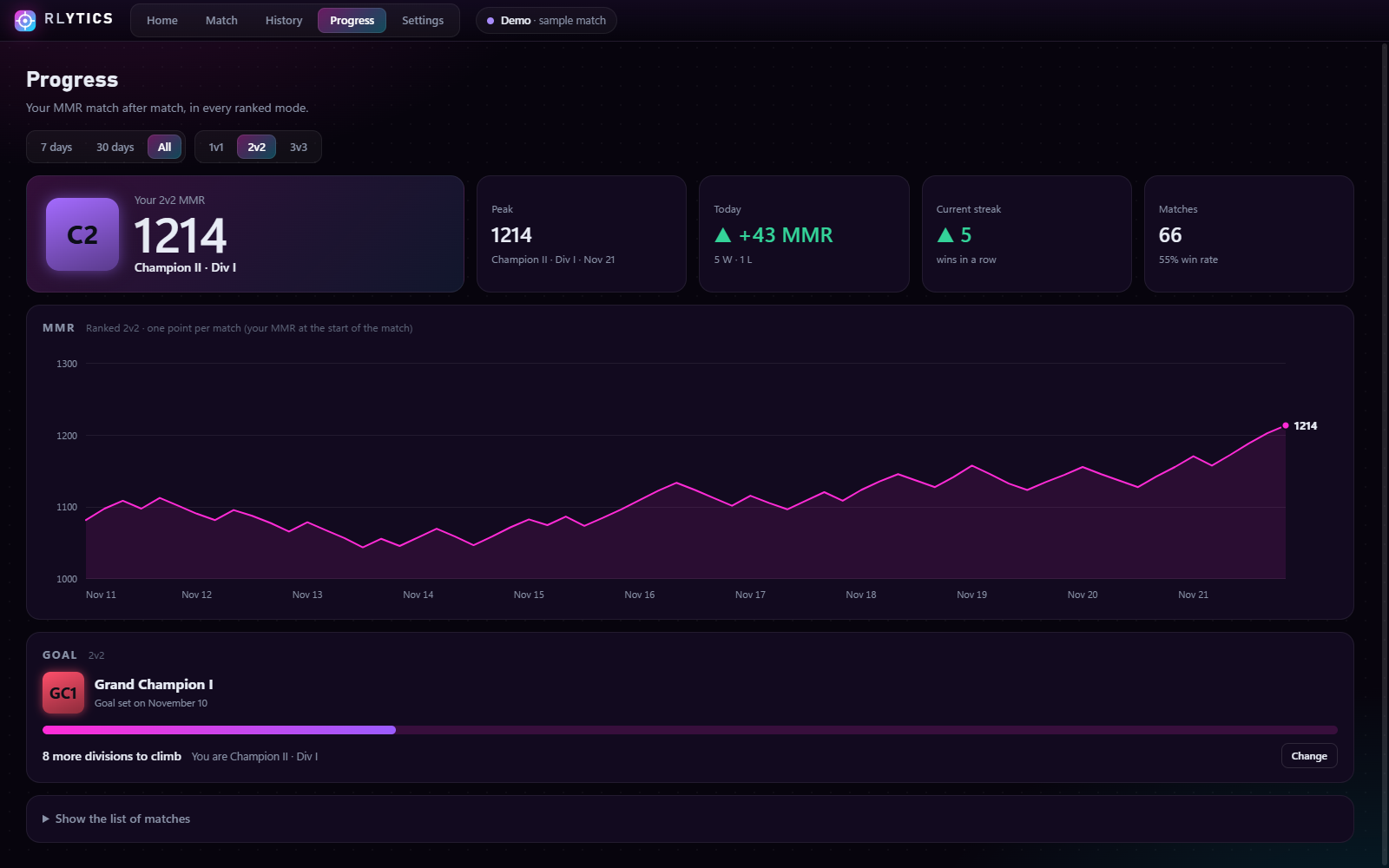
Your MMR curve match after match, in every ranked mode: your peak, your current streak, your day so far. Pick a goal (Grand Champion, for example) and track your progress division by division. Want a fresh start (new season, new account)? One click on Reset.

✎

Notes on players

Toxic, good teammate, smurf, troll… Put a note on a player: next time you meet them, it shows on their card and in your in-game Tab overlay.

♡

Anti-tilt

After several losses in a row, a short message suggests a break, on top of the game. A win resets the count. You can turn it off.

✦

Themes

7 color themes, and anime themes with their characters: My Dress Up Darling, Akame ga Kill, The Quintessential Quintuplets, The Future Diary, Bunny Girl Senpai, Haimiya-senpai, Kaoru Hana wa Rin to Saku, Re:Zero, Mushoku Tensei, Jujutsu Kaisen (Gojo and Sukuna), Chainsaw Man (Reze and Asa Mitaka), Uma Musume (Agnes Tachyon), Roshidere (Alya and Yuki), Akame ga Kill (Esdeath), Firefly Wedding (Satoko), Kill la Kill (Ryuko), Cyberpunk Edgerunners (Lucy and David), Oshi no Ko (Ruby, Kana, Ai and Akane), The Angel Next Door (Mahiru), Darling in the Franxx (Zero Two). The home page (clock, character, full screen) is perfect on a second screen.

⇣

Automatic updates

New versions download by themselves and install when you close RLytics. Nothing to do.
Your scoreboard, but better

One badge per player that fits in its row: the rank logo and division on top, the MMR right below. SSL players have no division, bots get nothing.

Nothing to set up: the positions are already measured on the real scoreboard and adapt to 16:9, 21:9 and 16:10 screens. If they’re off on yours, one photo of your scoreboard is enough to fix them.

Want to see your opponents’ 1v1 or 3v3 rank during a 2v2 match? Press F9: the Tab ranks switch to the next mode (key can be changed in the settings).

Illustration: made-up names and ranks.

BLUESCOREGOALSSAVES
GC1DIV III1586 MMR
Ayrton41221
SSL1902 MMR
Nova35613
C2DIV I1278 MMR
Kirika20102
ORANGESCOREGOALSSAVES
GC2DIV IV1712 MMR
Blitz38812
C1DIV II1205 MMR
Mochi24410
D3DIV II1120 MMR
Zéphyr13001

What it looks like

The Progress page: MMR curve, peak, streak and rank goal
Your progress (Neon theme)
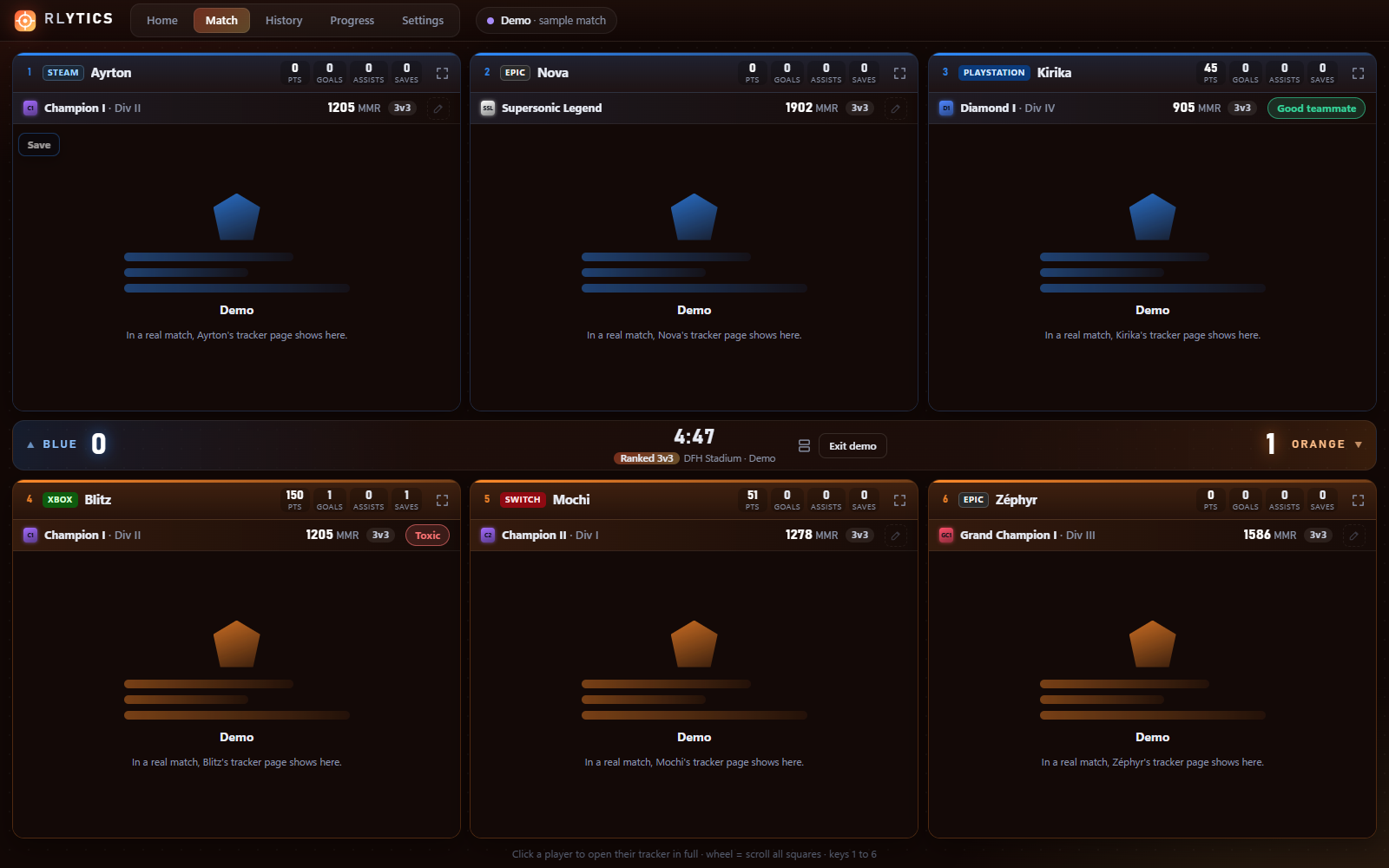
RLytics with the Ember theme during a match
Ember theme
RLytics settings: ranks in the Tab overlay
Tab rank settings

How it works

  1. Install RLytics. Windows may show “Windows protected your PC”: the app doesn’t have a paid signature. Click “More info”, then “Run anyway”.
  2. Start Rocket League in borderless windowed mode. If the game’s Stats API isn’t enabled yet, RLytics offers to enable it in one click (restart the game once).
  3. Play. As soon as the match starts, every player’s tracker shows up. The first time, tracker.gg asks for your cookie choice: do it once, it’s remembered.
  4. Hold Tab in a match. Everyone’s ranks show up on your scoreboard, already well placed in 1v1, 2v2 and 3v3. If they’re off on yours (different interface size…), one photo of the scoreboard in the settings is enough to fix them.

Frequently asked questions

Windows shows “Windows protected your PC”, is that normal?

Yes. Windows shows this message for programs without a paid signature (a certificate costs several hundred euros per year). Click “More info”, then “Run anyway”. It only shows up on install: automatic updates don’t trigger it.

Can I get banned?

RLytics doesn’t touch the game: it injects nothing, doesn’t read its memory and doesn’t even open its process. It reads Rocket League’s official Stats API (made by Psyonix for overlays) and shows a window on top of the game, like Discord or OBS. There’s no official guarantee from Psyonix, but it works the same way as allowed overlays.

Where do the ranks come from?

From the public pages of rocketleague.tracker.network, which RLytics shows like a browser. The Tab ranks are read from these already open pages, with no extra requests. RLytics isn’t affiliated with Tracker Network: if their site changes, an RLytics update may be needed.

Does it work on Steam and Epic? With a controller?

Yes to both. For a controller, pick the button that opens your scoreboard in the settings. PlayStation, Xbox and Switch players in your match show up too.

Does it slow down my game?

Pages load once at the start of the match, then they’re paused (still image) while Rocket League is in front, and theme animations stop during matches. If your PC is tight, turn off “Load trackers automatically” in the settings.

Do I need an account? Where does my data go?

No account. Everything stays on your PC: settings, history, notes on players, your MMR curve, rank positions. RLytics only connects to tracker.gg (player pages), AniList (anime theme images) and GitHub (updates). One exception: a comment or an idea you write yourself in Settings → Your feedback goes to the creator when you press “Send” (with the app version, the language and a random anonymous number, so they can answer you).

Is RLytics available in French?

Yes: Settings → Language. In “Auto”, RLytics follows your Windows language.

How do I get new versions?

Automatically: RLytics checks at startup, then every 3 hours, downloads the new version in the background and installs it when you close it (or right away with the “Restart” button).

I found a bug or have an idea, what do I do?

The easiest way: in RLytics, Settings → Your feedback → Comment (or Suggest an idea). The creator reads everything and answers you in the same place. For a bug, the log helps too: Settings → About → “Open the log”. This file explains what happened (it stays on your PC, nothing is sent). Describe the problem on the issues page and attach the log if you want.

Ready for your next match?

Download RLytics